




Template Design Software
Third-Generation FREEH Template Design Software

Product Advantages
FreeHCAD is a newly developed CAD tool for template design from CARV. Built on a philosophy of intelligent and efficient design, it boasts powerful features such as an intelligent pen tool, smart pattern arrangement, sequential sizing, image tracing, and a notching tool, all designed to significantly boost the productivity of template makers. The user interface combines graphics with text labels for easy recognition and usability; coupled with a simple "one-click" no-iron template function that streamlines complex workflows, it enables even novices to create sophisticated no-iron templates. Another key highlight is its ability to directly interface with the file formats used by mainstream template machines on the market.
Product Details
Product Details
Compatible Models
Product Features
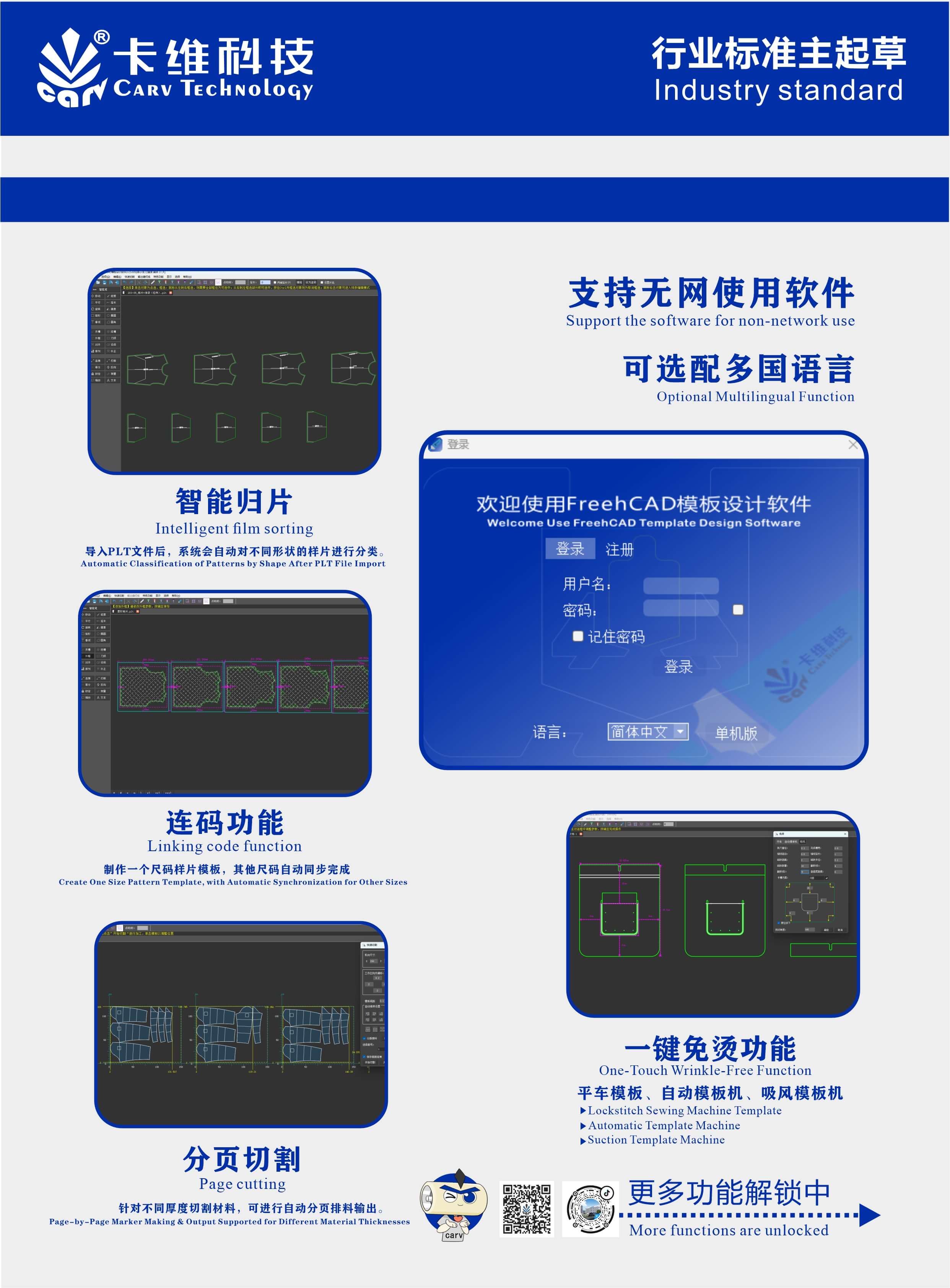
Featuring powerful template design capabilities, the intelligent pattern sorting function significantly reduces the time required to categorize sample patterns. The multi-size grading function enables the direct creation of templates across a full range of sizes; by designing just a single size, the other sizes are generated automatically, thereby boosting template design efficiency several-fold.
Fundamentals of FreeCAD Software
Basic Knowledge of Freehand CAD Software
Freehand software moving tool
Using Common Tools
Key Features of FreeCAD Software
Alignment Tool
Arrangement Function
Automatic code setting
Automatic Code Setting in Three Arrangement Modes
Batch Add Outer Frame
Batch Arrangement in Linked Code Mode
Batch Correction
Batch Correction in Linked Code Mode
Batch Delete Short Lines
Batch Deletion Method
Batch Pattern Making
Change from dashed line to solid line
Code Setting Function
Collinear Cutting
Create a trapezoidal card slot
Divide Function
Evenly Distribute Circles Along Arc Lines
Export PLT Files in Three Ways
Extension to the edge function
Force Line Connection Function
Grouping Function Application
Image Tracing Function
Insert Multiple Files Function
Intelligent Film Classification
Intelligent pen tool
Intelligent stitching function
Laser Slotting
Line-up inspection
Linked Code Function (Part 1)
Mirror Function on Any Axis
Modify Cutting Order of Pattern Pieces
Navigation function
One-click anti-stain for tortoise shell
One-click anti-stain treatment for tortoise shells
One-click batch slotting and frame addition
One-click code setting
One-Click Extend Internal Lines to Edge
One-click ironing-free packaging (flat carton)
One-click slotting
Output Stitching Lines
Output Stitching Lines for Individual Sizes in Mesh View
Output Stitching Lines in Dahao Template Machine Format
Output Stitching Lines in Template Machine Format
Parallel Tool
Pattern Piece Color Fill Function
Pick Tool
Point Break — Three Modes
Quick Code Set Completion
Quick Cutting Pagination Function
Reset Pattern Placement Function
Shortcut Key Settings
Slot Plan Export Function
Slotted Pattern Unfolding
Stitching Function
Trace Function (Photos Taken by Mobile Phone)
Trim Tool
Zigzag / Serration Tool
Practical Examples of FreeCAD Software Usage
How does Freehcad software handle situations where there are too many lines?
How to add text to the frame using FreeCAD software
 Home
Home
 Tel
Tel
 Contact
 E-mail